In Excel Optimization for Financial Modeling a Modernization Guide – Part 1: Fix Excel, we focused on optimizing Excel: making models faster, smaller, and more stable.
But optimization alone doesn’t answer the bigger question many teams face next:
When is Excel still enough — and when is it time to modernize?
This post explores the hybrid Excel + Python / Power BI framework and the decision criteria for evolving financial models responsibly—without rushing into costly or disruptive platform migrations.
How to Decide: Optimize, Hybridize, or Migrate?
Modernization isn’t a binary choice. Most teams exist on a spectrum, and the “right” answer depends on scale, complexity, and regulatory pressure.
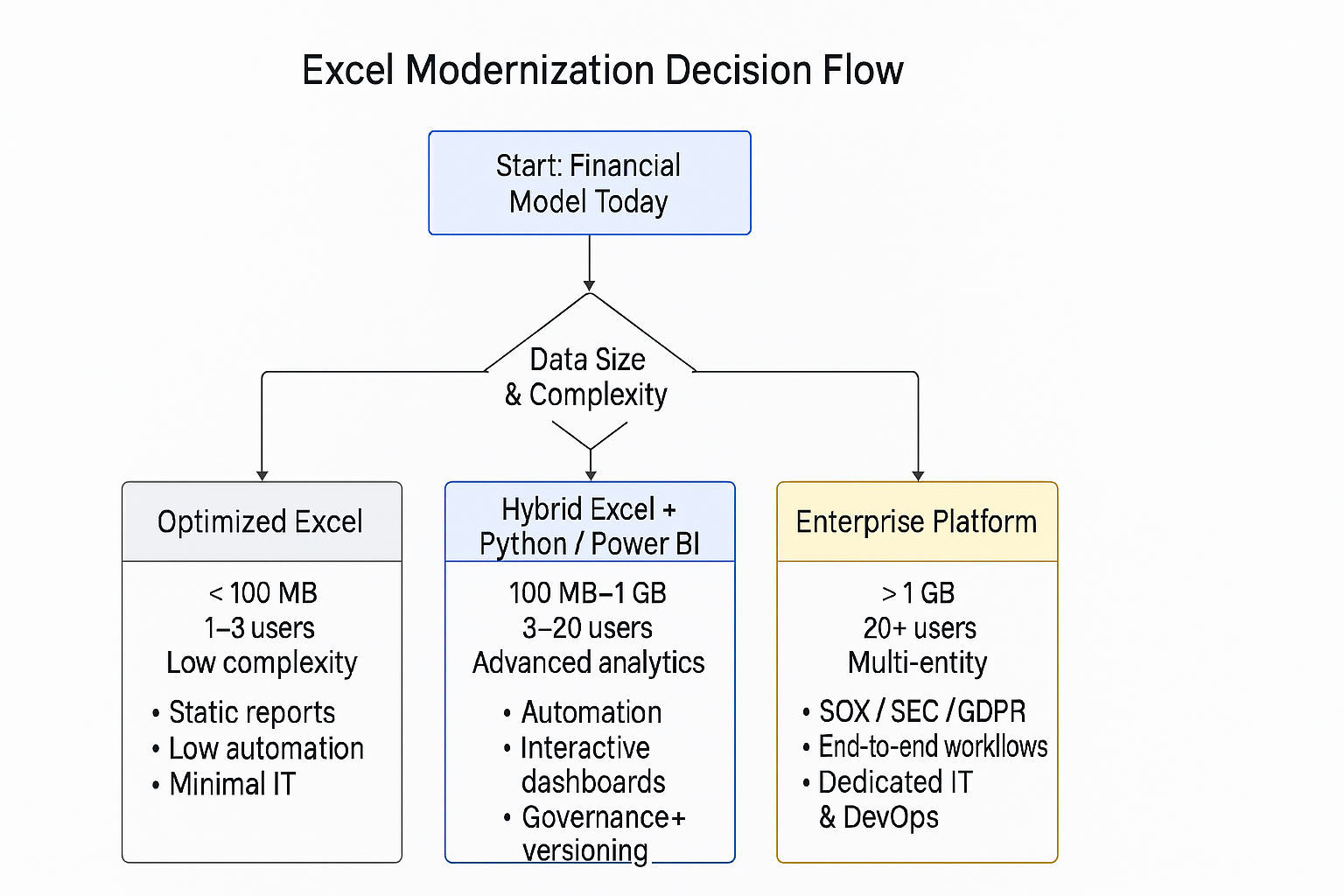
Here’s a practical way to think about the decision.
Stay with Optimized Excel when:
- Data volumes are relatively small (under ~100 MB)
- Only one to three users actively work in the model
- Logic is simple to moderately complex
- Regulatory requirements are light
- Automation and integrations are minimal
- IT involvement is limited
In these cases, disciplined Excel optimization often delivers strong returns with minimal disruption.
Move to a Hybrid Excel + Python / Power BI approach when:
- Data volumes begin approaching hundreds of megabytes
- Models are used by multiple analysts or teams
- Advanced analytics, scenario modeling, or automation is required
- Auditability and versioning start to matter
- Data needs to be refreshed from SQL, APIs, or data lakes
- Interactive reporting becomes valuable
This is the “middle ground” where Excel remains the modeling interface, but Python and Power BI provide scale, automation, and governance.
Migrate to a Full Platform when:
- Data volumes exceed practical Excel limits
- Dozens of users require concurrent access
- Models span multiple entities, scenarios, or business units
- Regulatory oversight is high (SOX, SEC, GDPR)
- End‑to‑end workflow automation is required
- Dedicated IT and DevOps support is available
Hybrid approaches often defer—or entirely avoid—this step, buying time and reducing risk.
Governance, Security, and Compliance Aren’t Optional
As models grow in importance, governance must evolve alongside them.
Hybrid architectures enable enterprise‑grade controls while preserving Excel usability.
Data Lineage & Traceability
- Maintain a clear inventory of model data sources
- Document transformations using Power Query steps, Python code comments, and Power BI lineage views
- Preserve full audit trails via SharePoint version history, Git, and Power BI refresh logs
Transparency is critical when models support external reporting, audits, or executive decision‑making.
Role‑Based Access Control (RBAC)
- Protect Excel models with SharePoint/OneDrive permissions and Information Rights Management
- Apply role‑based and row‑level security in Power BI datasets and reports
- Store Python code in secure repositories with access logging
Access should be intentional, reviewed, and auditable.
Identity, Authentication, and Compliance
- Use Entra ID (Azure Active Directory) for single sign‑on across Excel, Power BI, and Python environments
- Enforce conditional access (MFA, device compliance)
- Use managed identities or service principals for automated refreshes and integrations
For regulated industries, compliance requirements aren’t theoretical—they’re enforced.
Addressing Technical Debt Before It Compounds
Most legacy Excel models carry years of accumulated debt: undocumented macros, hidden links, inconsistent logic, and unsupported add‑ins.
Ignoring this debt makes modernization harder—and riskier.
Practical remediation starts with:
- Inventorying critical models and dependencies
- Reviewing and refactoring VBA and complex logic
- Removing orphaned links, named ranges, and unused sheets
- Identifying hardcoded assumptions and manual overrides
- Prioritizing high‑risk models for cleanup or migration
Addressing debt early improves reliability and accelerates adoption downstream.
Enterprise Data Integration: Making Models Trustworthy
Modern finance models pull from many sources—SQL databases, Snowflake, data lakes, and APIs.
A hybrid approach enables:
- Secure connectivity via encrypted ODBC/JDBC drivers
- Managed identities and service principals for least‑privilege access
- Centralized refresh logic with Power BI, Power Query, and orchestration tools
- Strong handling of sensitive data through masking, encryption, and access controls
- Full audit logging for monitoring and incident response
Reliable models require reliable data pipelines.
Change Management Still Makes or Breaks Success
Good architecture means nothing if people don’t use it.
Successful teams invest in:
- Targeted training on Python in Excel, Power Query, and Power BI
- Code review and validation standards
- Communities of practice and shared learning
- Ongoing support, documentation, and feedback loops
Modernization only sticks when users trust—and understand—the system.
This approach:
- Preserves what teams know
- Introduces scalable analytics and automation
- Improves governance and auditability
- Reduces operational risk
- Creates a runway for future platform decisions
In Practice: From Excel Optimization to Hybrid and Beyond
Frameworks make sense on paper — but modernization decisions usually happen because something breaks, slows down, or becomes risky. The examples below illustrate how teams typically move from optimized Excel to hybrid models, and when full platforms become necessary.
These examples are composite scenarios based on common patterns seen across Financial Services and Capital Markets.
Example 1: Optimizing Excel to Buy Time and Reduce Risk
Starting point
A small finance team maintains a multi‑tab Excel model supporting monthly reporting and forecasts. Over time, the file has grown past 80 MB, recalculations take several minutes, and analysts are afraid to touch certain formulas.
Action taken
- Migrated raw data ingestion to Power Query
- Filtered and transformed data before loading
- Replaced volatile formulas with helper columns
- Converted historical calculations to static values
- Saved the model as
.xlsb
Outcome
- Recalculation time dropped drastically
- File size was reduced by more than half
- The model became more stable and auditable
- No retraining or architectural changes were required
Why this mattered
Optimized Excel was sufficient at this stage. The business bought time, reduced operational risk, and avoided premature migration while usage and complexity remained low.
Example 2: Moving to a Hybrid Excel + Python / Power BI Model
Starting point
A team of analysts supports scenario analysis and stress testing across investment portfolios. Data volume approaches several hundred megabytes, multiple users need access, and logic begins to exceed what’s manageable in formulas alone.
Signals that optimization wasn’t enough
- Excel handled inputs well, but heavy logic was fragile
- Scenario runs required manual copy/paste workflows
- Versioning and audit trails became difficult
- Reporting was static and quickly out of date
Action taken
- Retained Excel for assumptions and interfaces
- Introduced Python in Excel for simulations and data preparation
- Centralized datasets in Power BI
- Implemented role‑based access and version control
Outcome
- Complex analytics ran faster and more reliably
- Excel remained the familiar front end
- Python introduced automation and reproducibility
- Power BI provided interactive, governed reporting
Why this mattered
The hybrid approach solved scaling and governance problems without forcing a full platform migration. Excel stayed relevant, but no longer carried responsibilities it wasn’t designed for.
Example 3: When a Full Platform Becomes Inevitable
Starting point
An enterprise FP&A function supports regulatory reporting, rolling forecasts, and multi‑entity planning across regions. Dozens of users need concurrent access, data volumes exceed Excel’s limits, and audit scrutiny is high.
Challenges encountered
- Excel files couldn’t support concurrency
- Manual controls created audit risk
- Refresh and reconciliation processes were brittle
- Integration with ERP systems became complex
Action taken
- Migrated core planning and reporting models to an enterprise platform
- Retained Excel only for localized analysis and ad‑hoc exploration
- Formalized end‑to‑end workflows with centralized governance
Outcome
- Strong auditability and compliance
- Scalable planning across the organization
- Dedicated IT and DevOps support
- Higher cost, but justified by regulatory and operational needs
Why this mattered
This was not a failure of Excel — it was a signal that the problem space had outgrown spreadsheets entirely.
In short
Modernizing financial models isn’t about choosing the newest tool—it’s about choosing the right level of sophistication for the problem you’re solving.
As Part 2 of this series shows, most teams don’t need to leap from Excel straight into a full enterprise platform. By understanding where your models sit today—across data size, complexity, governance, and scale—you can modernize deliberately: optimizing first, adopting a hybrid Excel + Python / Power BI approach when the need arises, and moving to full platforms only when business and regulatory demands truly require it.
The hybrid stage is often where the biggest gains are realized: Excel remains familiar and flexible, while Python and Power BI introduce automation, scalability, and governance without unnecessary disruption.
Further Reading & Documentation
| Topic | Why It Matters | Documentation |
|---|---|---|
| Power Query (Excel & Power BI) | Data ingestion, transformation, and performance optimization | Microsoft Power Query Docs |
| Excel Data Model (Power Pivot) | In‑memory analytics and scalable relational modeling | Excel Data Model Overview |
| Python in Excel | Advanced analytics, automation, and ML directly in Excel | Python in Excel Docs |
| Fabric Adoption Roadmap | Operating models, ownership, and enterprise controls | Fabric Adoption Roadmap |
In Part 3, we’ll dive deeper into operational readiness—how to make modernized models observable, supportable, and resilient in real‑world environments.
 Serendipituos Code
2 thoughts on “Part 2: When Excel Needs to Grow Up — The Hybrid Excel + Python / Power BI Framework”