In Part 3: Future-State Architecture, Modernizing Excel Financial Modeling of the Excel modernization series, the focus moved from when to modernize to what a modern financial modeling environment should look like. The article introduced a future‑state reference architecture that treats Excel as part of a governed, scalable analytics system—not a standalone spreadsheet. It showed where Excel still adds the most value, where Python and Power BI should take over, and how enterprise data sources can be integrated safely at scale.
Key Takeaways from part 3 are that modernizing Excel financial modeling isn’t about replacing spreadsheets—it’s about designing a future‑state architecture where Excel operates as part of a governed, scalable analytics system alongside Python, Power BI, and enterprise data platforms.
This architectural clarity enables financial models to scale safely, meet governance requirements, and set the foundation for reliable production operations.
This architectural foundation sets up Part 4, which shifts from design to execution—making sure modernized Excel‑based models are reliable, well‑managed, and sustainable in real production environments.
Operational Readiness Framework
Modernizing Excel-based financial modeling into a hybrid or cloud‑enabled environment requires ensuring that the solution is not only functional but also observable, supportable, and resilient. This section outlines the operational capabilities needed for real-world production readiness across Finance, IT, and Data Platform teams.
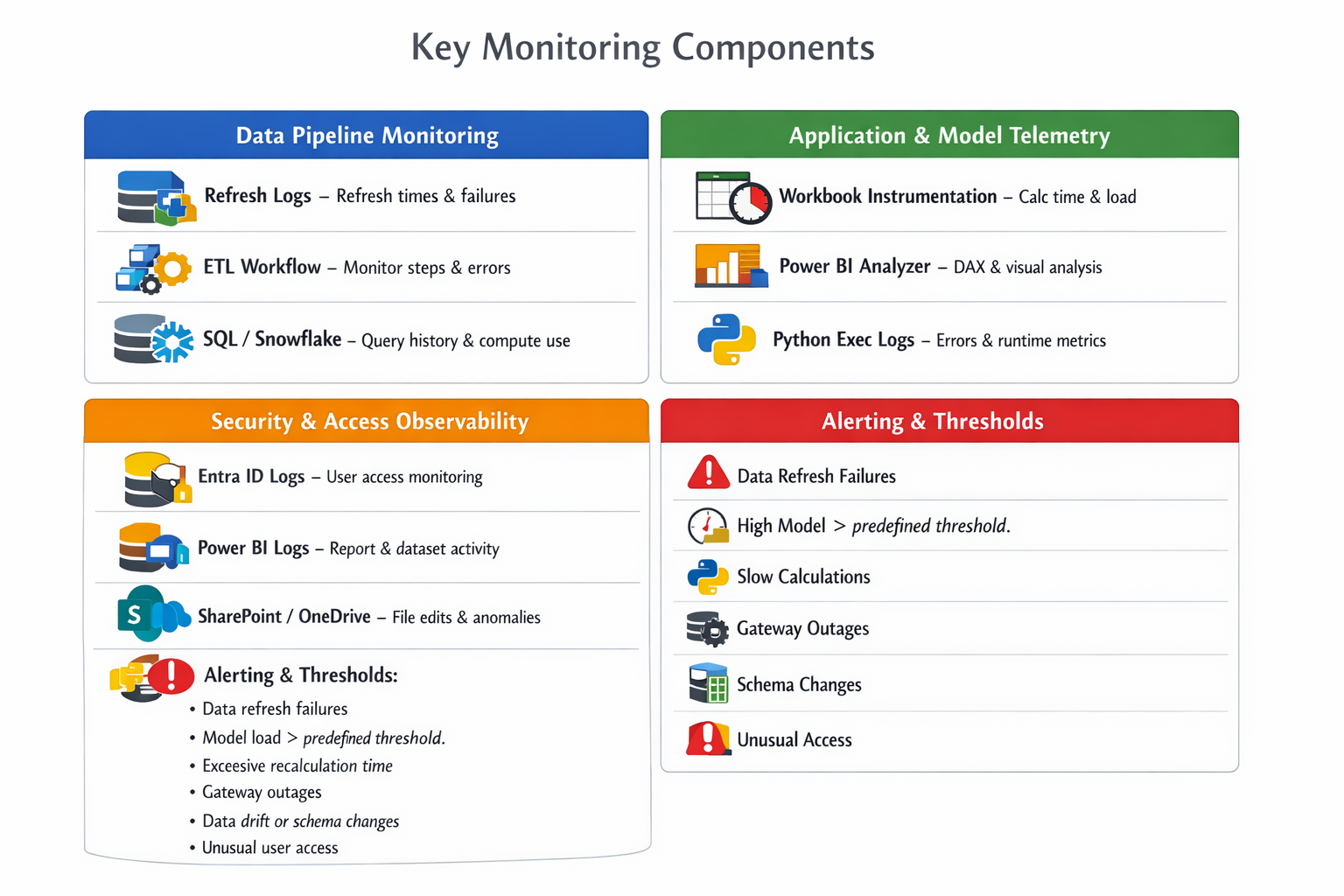
Observability
Observability is the foundation of operational readiness: modernized Excel financial models must provide end‑to‑end visibility across data pipelines, model performance, and user activity so teams can detect issues early, diagnose root causes quickly, and respond before business impact occurs through proactive monitoring, security-aware logging, and clear alert thresholds.
Ensure clear visibility into data pipelines, refresh behavior, model performance, and user activity to proactively detect and resolve issues.
Supportability
Ensure the environment can be maintained, troubleshot, and improved with minimal downtime or user disruption.
Support must be layered: A tiered support model ensures the right issues are handled by the right teams—self‑service for common problems, Finance Ops for day‑to‑day model issues, IT/Data Platform for infrastructure, and Engineering only when true system-level complexity is involved.
Operational maturity depends on documented processes: Standard Operating Procedures (SOPs) turn fragile, person‑dependent fixes into repeatable actions. This reduces downtime, speeds resolution, and prevents knowledge loss when people change roles.
Models are production assets, not personal files: Certification and lifecycle management formalize when a model is ready for production, how it’s governed, and when it should be retired—improving auditability, performance, and trust.
Version control and standards are non‑negotiable at scale: Using Git for Python, SharePoint versioning for Excel, and defined naming and documentation standards prevents silent breakage and supports regulated environments.
Environment consistency prevents hidden failures: Locked Python dependencies, controlled Power BI workspaces (Dev/Test/Prod), and certified Excel templates reduce “it worked yesterday” issues caused by drift or unmanaged changes.
Operational readiness enables sustainable modernization: Without support models, SOPs, certification, and environment management, even well‑designed architectures degrade over time. These components are what make modernized Excel models reliable in real production use.

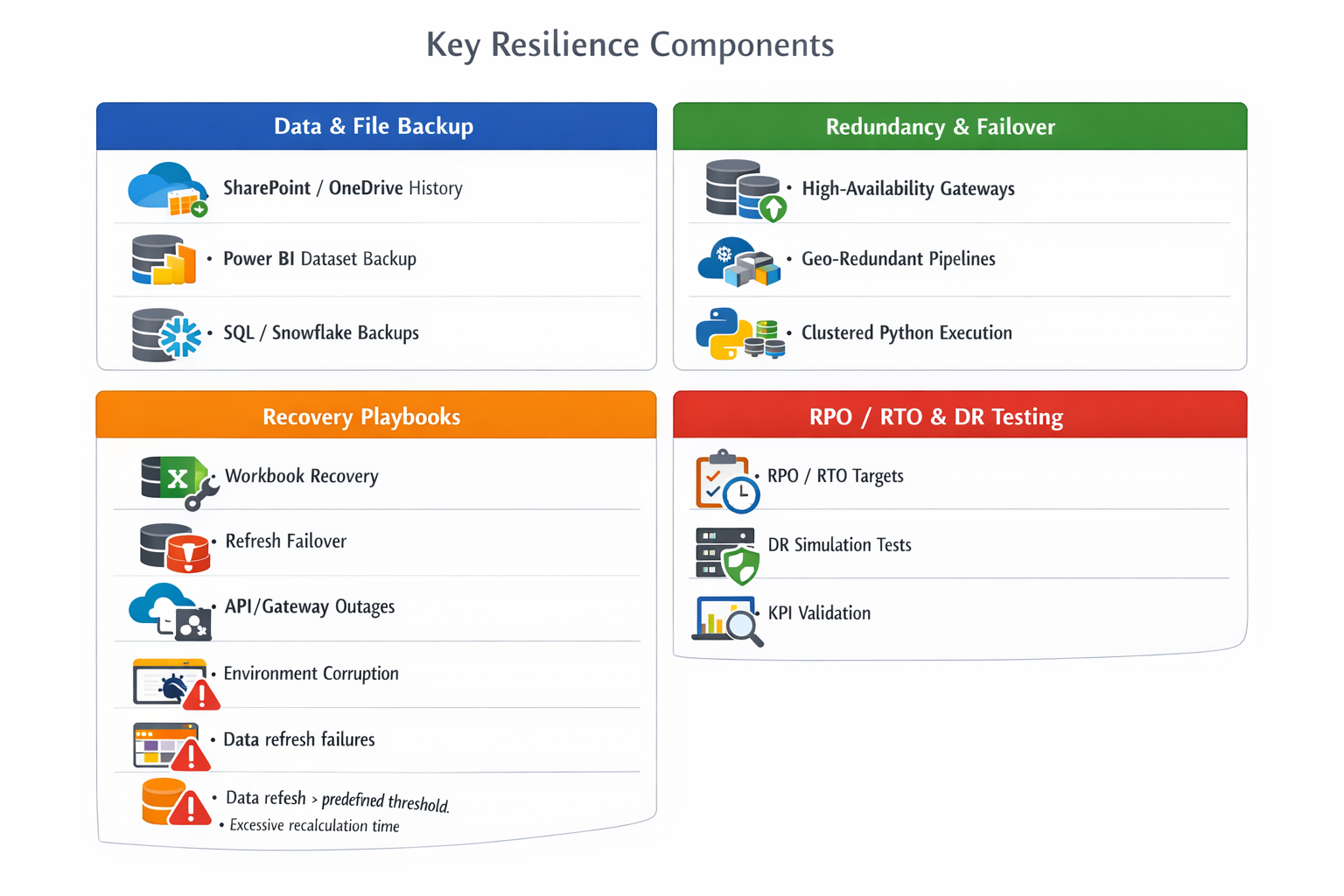
Disaster Recovery & Business Continuity
Ensure financial modeling continuity in the event of failures—technical, operational, or human error.
Backups must be built-in, not ad hoc: Continuous version history and automated backups (Excel, Power BI, databases) are foundational to protecting business‑critical financial models.
High availability is required for production models: Gateways, pipelines, and compute should be designed with redundancy and failover so a single component failure doesn’t halt reporting or analysis.
Recovery needs documented, tested playbooks: Teams should know exactly how to recover from common failure scenarios—corrupted workbooks, failed refreshes, gateway outages, API issues, or Python environment breaks—without improvisation.
RPO and RTO must be explicit and measurable: Defining acceptable data loss (RPO) and recovery time (RTO) turns resilience from an abstract goal into an operational commitment aligned with business impact.
Disaster recovery only works if it’s tested: Regular tabletop exercises and full failover simulations are necessary to validate that backups, recovery steps, and restored models actually work under real conditions.
Resilience completes modernization: A modernized Excel‑based analytics environment is not production‑ready until it can fail, recover, and restore confidence without disrupting the business.
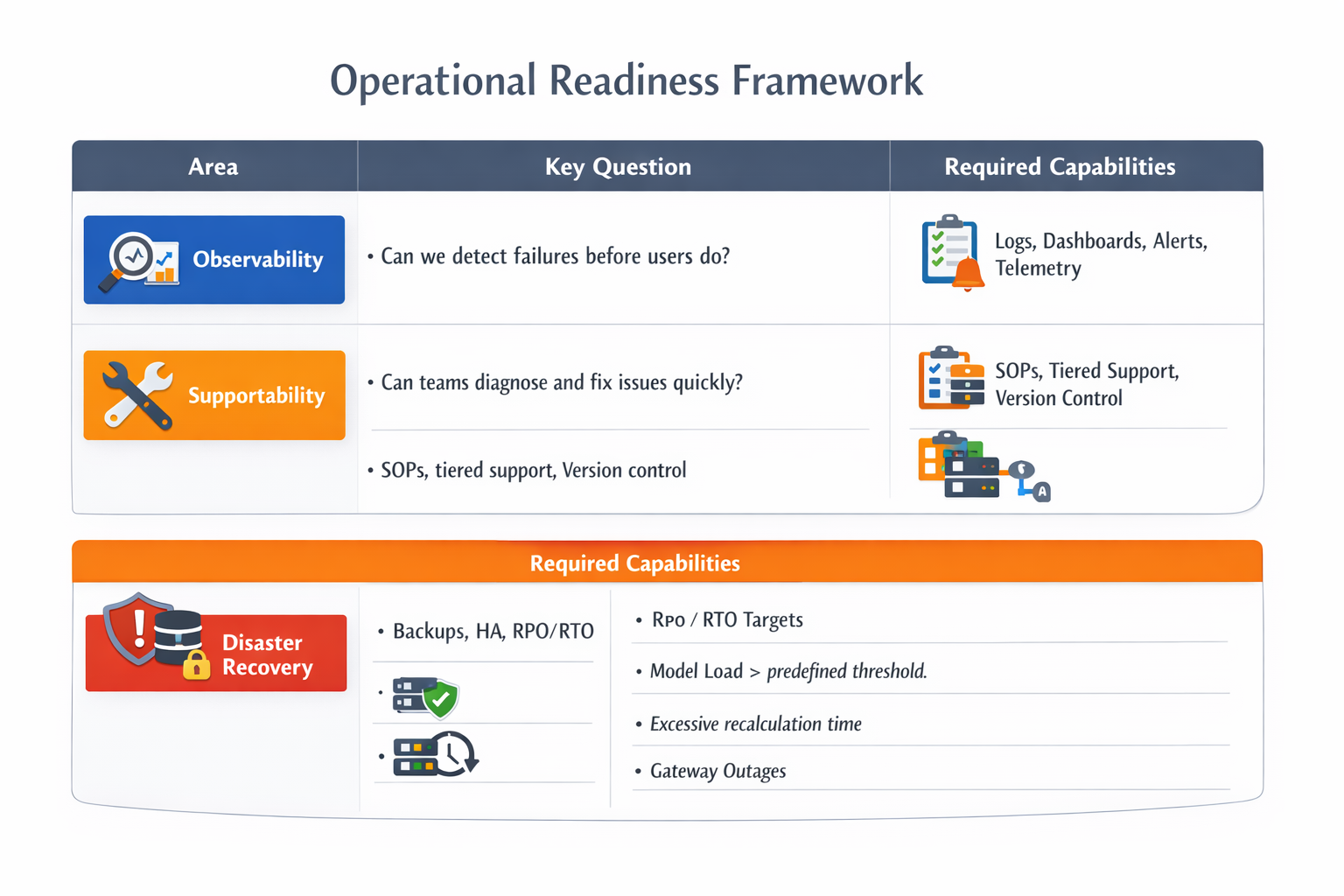
Operational Readiness Summary
Key takeways:
Observability comes first. Teams must detect failures before users do using logs, dashboards, alerts, and telemetry—this is what turns reactive firefighting into proactive operations.
Supportability makes fixes fast and repeatable. Clear SOPs, a tiered support model, and version control ensure issues can be diagnosed and resolved quickly without relying on tribal knowledge.
Disaster recovery protects the business, not just systems. Backups, high availability, defined RPO/RTO targets, and tested failover playbooks ensure models can recover from outages without material business impact.
Operational readiness is a system, not a tool. Reliable modernized Excel models require all three areas working together: detect early, fix quickly, and recover confidently.
Series Conclusion: Modernizing Excel Without Breaking What Works
This series set out to answer a question many finance teams quietly struggle with: how do you modernize Excel‑based financial modeling without losing speed, trust, or control?
Across the four parts, we moved deliberately from optimization, to decision‑making, to architecture, and finally to operational readiness. The result is a practical modernization path that treats Excel not as a liability to replace, but as a core component of a broader, governed analytics system.
We showed how high‑impact Excel optimizations reduce performance risk, when a hybrid Excel + Python / Power BI approach becomes necessary, how a future‑state architecture enables scale and governance, and why operational readiness—observability, supportability, and resilience—is what ultimately determines whether modernized models succeed in production.
Modernization is not about abandoning Excel. It’s about evolving it intentionally, assigning the right responsibilities to the right tools, and operating financial models with the same discipline as any other business‑critical system.
Final Thoughts
If Excel sits at the center of your financial modeling today, start by asking three simple questions:
- Are our most critical models fast, stable, and auditable?
- Do we know when they fail, why they fail, and who owns the fix?
- Could we recover confidently if something broke tomorrow?
Use this framework to assess where you are—optimized Excel, hybrid analytics, or full platform migration—and take the next step deliberately, not reactively.
Modernization works best when it’s incremental, governed, and operationally ready.
Treat Excel like a system—not just a spreadsheet—and it can remain a powerful, trusted part of your analytics stack for years to come.
 Serendipituos Code